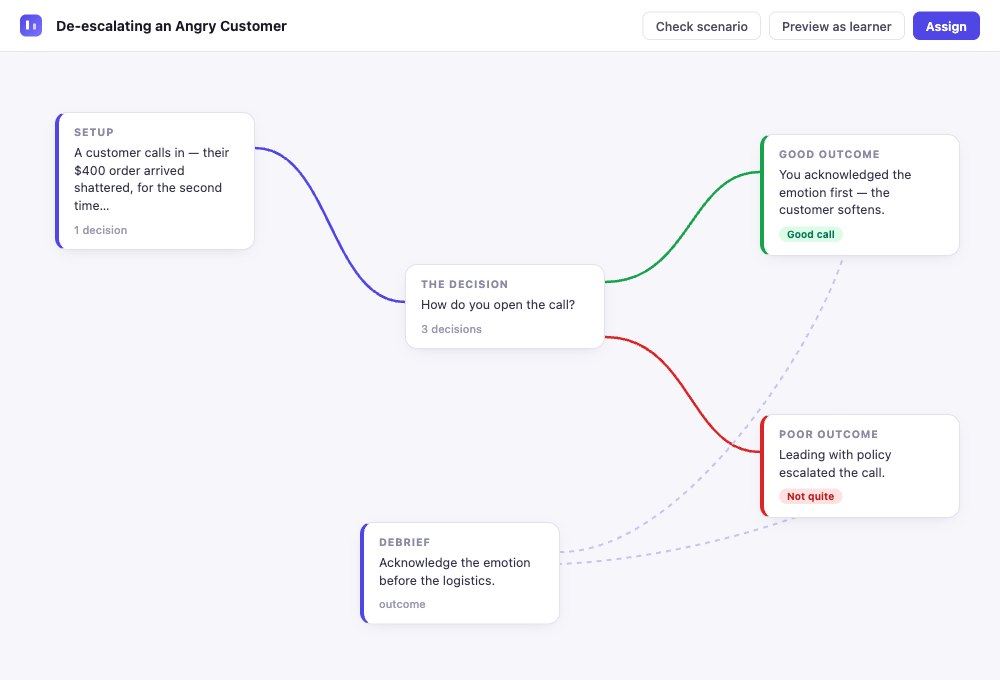
Paste your story. AI finds the branch points. You take it from there.
A visual editor for branching interactive fiction — with AI that understands narrative structure. No code required.
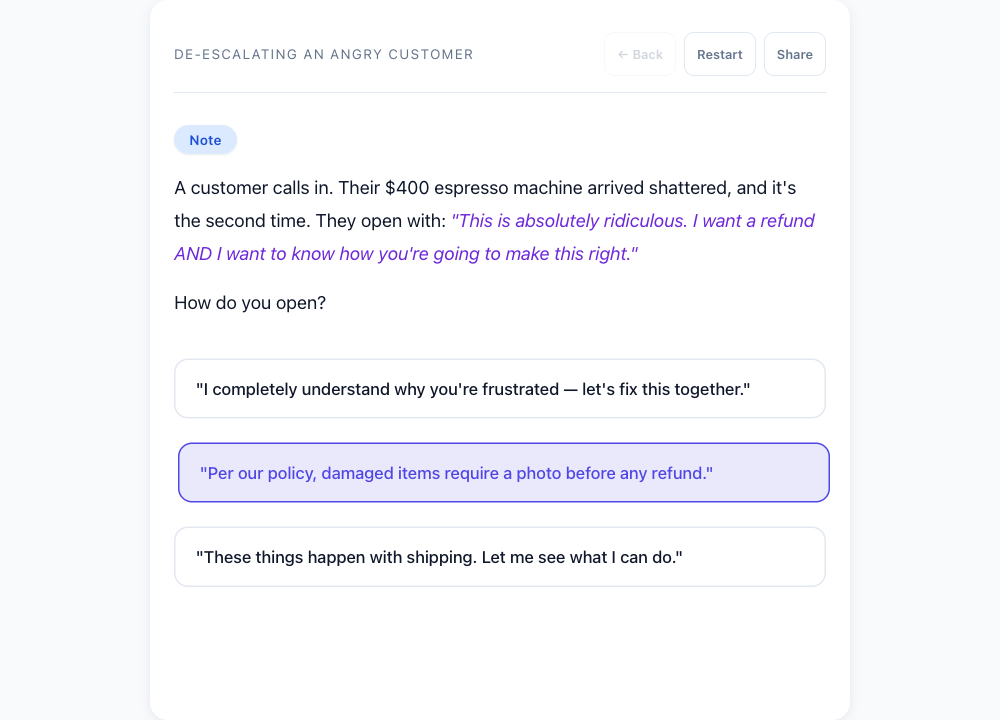
Play a Branching Story
This is what your readers experience. Make a choice and watch the story split.
How It Works
For fiction writers, game designers, educators — anyone who thinks in branches.
Start with words
Paste existing writing and let Splinter find the branch points, describe a premise for AI to outline, or start from a blank canvas.
- AI writes, rewrites, and continues your scenes
- Accept or reject before committing
Branch & build
See your entire story as a visual map. Drag, zoom, and rearrange scenes at a glance.
- Branch Wizard generates multiple paths at once
- Expand with AI turns dead ends into new scenes
- Validate for broken links and orphan scenes
Publish & share
One click to publish to the community library, or publish unlisted for a private link.
- Readers play in any browser, no account needed
- Pro: analytics show which paths readers choose
Everything you need to create — free
No limits on reading, creating, or publishing. Pro adds analytics, more AI power, and export for serious creators.
- Read & play unlimited stories
- Create, edit & publish stories
- Visual story map with undo/redo
- Share drafts for feedback
- 10 AI calls/day
- Everything in Free
- 200 AI calls/day
- Choose your AI writing model
- Twine/Twee export
- Reader analytics — see how readers navigate your stories
Your stories are always yours — JSON export always free, no lock-in.
Or explore what others have built
Play through branching stories crafted by the community — free, no account needed.
Browse StoriesPrivacy Policy
Last updated: March 16, 2026
What We Collect
When you sign in with Google, we receive and store:
- Your name and email address (from your Google profile)
- Your Google account ID (used to identify your account)
When you use StorySplice, we also store:
- Stories you create, edit, and publish
- Your reading progress and saved positions
Payment Information
Pro subscriptions are processed by Stripe. We never see or store your full card number. Stripe provides us with a customer ID and subscription status so we can manage your account.
Cookies & Sessions
We use a single session cookie containing a JSON Web Token (JWT) to keep you signed in. We do not use advertising cookies or retargeting.
Analytics
We use Google Analytics to understand how visitors use StorySplice — which pages are visited and general usage patterns. Google Analytics uses cookies and collects anonymized interaction data. No personally identifiable information is sent to Google Analytics. You can opt out by using a browser extension like Google's Analytics Opt-out Add-on.
Third-Party Services
- Google OAuth — for sign-in only. We request minimal profile scopes.
- Stripe — for payment processing. Subject to Stripe's Privacy Policy.
- OpenRouter — AI writing requests are sent to OpenRouter for processing. Prompts include story context you provide. Subject to OpenRouter's Privacy Policy.
- Cloudflare — hosts the application and database. Subject to Cloudflare's Privacy Policy.
- Google Analytics — for anonymous usage analytics. Subject to Google's Privacy Policy.
What We Don't Do
- We do not sell your data
- We do not use analytics data to identify individual users
- We do not share your data with advertisers
- We do not send marketing emails
Data Storage
Your data is stored in Cloudflare D1 (SQLite) and is associated with your Google account ID. Data is stored in Cloudflare's infrastructure and is subject to their security practices.
Your Rights
You can request deletion of your account and all associated data by contacting us. We will remove your account, stories, and saved progress.
Contact
For privacy questions or data deletion requests, email info@threadlimit.co.
Accessibility Statement
Last updated: February 27, 2026
Our Commitment
StorySplice is committed to making interactive storytelling accessible to everyone. We aim to conform to WCAG 2.1 Level AA standards.
What We've Done
- Keyboard navigation — all interactive elements are reachable and operable via keyboard
- ARIA labels — buttons, modals, and dynamic content are labeled for assistive technology
- Color contrast — text meets WCAG AA contrast ratios against our dark theme
- Screen reader support — live regions announce dynamic content changes (story text, AI generation status)
- Focus management — focus is moved appropriately when opening modals and navigating between screens
- Reduced motion — animations are disabled when the user prefers reduced motion
- Semantic HTML — proper heading hierarchy, landmark regions, and form labels throughout
Known Limitations
- The visual story map editor relies on SVG and drag interactions that may be difficult to use with screen readers. All editing functions are also available through the node edit modal, which is fully keyboard-accessible.
- AI-generated content may not always meet readability standards. We recommend reviewing AI-generated text before publishing.
Testing
We test StorySplice with VoiceOver on macOS, keyboard-only navigation in Chrome and Firefox, and automated tools including axe-core for WCAG compliance scanning. We test at multiple viewport sizes to ensure the responsive layout maintains accessibility across devices.
Feedback
If you encounter accessibility barriers, please email info@threadlimit.co. We take accessibility issues seriously and will work to address them promptly. Include the browser and assistive technology you are using so we can reproduce and fix the issue.
About StorySplice
StorySplice is built by Colin Urban at Threadlimit.co. I'm a software developer and writer who has spent years working at the intersection of technology and creative tools. I built StorySplice because I believe AI should enhance human creativity, not replace it — writers deserve tools that suggest, draft, and expand while leaving every final decision in human hands.
Why I Built StorySplice
Interactive fiction has a long history, from early text adventures to modern tools like Twine. But most existing tools either require learning a programming language or offer no AI assistance at all. I wanted to create something different: a visual editor where you can see your entire story structure at a glance, with AI that understands narrative flow well enough to help you branch, expand, and write — without ever overriding your creative vision. StorySplice grew out of a simple question: what if turning a short story into a branching adventure was as easy as pasting your text and letting AI find the natural decision points?
What is StorySplice?
StorySplice is a web-based visual editor for creating branching interactive fiction. You build a story as a map of connected scenes where each scene can lead to multiple reader choices. The visual story map lets you drag, zoom, and rearrange scenes to see every path and ending at a glance. Readers then play through your published story, making decisions that shape the narrative. StorySplice works in any modern browser with no installation or downloads required, and your stories are always exportable — no lock-in.
How is it different?
StorySplice combines a visual drag-and-drop editor with AI that understands narrative structure. Features like Splinter (which finds branch points in existing linear text and generates a full branching structure) and Branch Wizard (which creates multiple diverging paths from any scene in a single action) are unique to StorySplice. Unlike code-based tools, you never write a line of code. Unlike simpler editors, you get AI writing assistance with multiple model choices, story validation that catches orphan scenes and broken links, reader analytics showing how audiences navigate your stories, and Twine/Twee import and export for interoperability with the wider interactive fiction ecosystem.
Contact
For questions, feedback, or support: info@threadlimit.co
Terms of Service
Last updated: March 16, 2026
Acceptance
By using StorySplice, you agree to these terms. If you do not agree, do not use the service.
The Service
StorySplice is a web-based tool for creating and publishing interactive branching stories. It is operated by Threadlimit.co. We may update, modify, or discontinue features at any time.
Accounts
You sign in via Google OAuth. You are responsible for maintaining the security of your account. You must be at least 13 years old to use StorySplice.
Your Content
You own your stories. StorySplice does not claim ownership of any content you create. You retain all rights to your work and can export or delete it at any time.
By publishing a story on StorySplice, you grant us a non-exclusive, worldwide license to display and distribute your published story within the StorySplice platform, and to feature published stories for promotional purposes (e.g., on the landing page or in social media). You can revoke this license at any time by unpublishing or deleting your story.
Acceptable Use
You agree not to publish content that:
- Promotes hate speech, violence, or discrimination
- Contains illegal content or facilitates illegal activity
- Infringes on the intellectual property rights of others
- Is spam or solely designed to manipulate search engines
We reserve the right to remove content that violates these guidelines and to terminate accounts that repeatedly break these rules.
AI Features
AI-generated content is produced by third-party models via OpenRouter. We do not guarantee the accuracy, quality, or appropriateness of AI-generated text. You are responsible for reviewing and editing AI output before publishing.
Payment & Subscriptions
Pro subscriptions are billed monthly ($5/month) or annually ($48/year) via Stripe. You can cancel at any time through the billing portal. Refunds are handled on a case-by-case basis — contact us at info@threadlimit.co.
Disclaimer
StorySplice is provided "as is" without warranties of any kind, express or implied. We do not guarantee that the service will be uninterrupted, error-free, or that your data will never be lost. You use StorySplice at your own risk.
Limitation of Liability
To the maximum extent permitted by law, Threadlimit.co shall not be liable for any indirect, incidental, special, consequential, or punitive damages, or any loss of profits or data, arising from your use of StorySplice.
Changes to These Terms
We may update these terms from time to time. Continued use of StorySplice after changes constitutes acceptance of the new terms.
Contact
Questions about these terms? Email info@threadlimit.co
FAQ
What is StorySplice?
StorySplice is a visual editor for creating branching interactive fiction — the kind of stories where readers make choices that shape the narrative, sometimes called choose-your-own-adventure stories. You build your story as a visual map of connected scenes, where each scene can lead to multiple reader choices. The editor lets you drag, zoom, and rearrange scenes so you can see every path and ending at a glance. Once your story is ready, you publish it with a single click and share a link that anyone can play in their browser. StorySplice is free to use, runs entirely in the browser with no installation required, and works on desktop and mobile devices.
How does the story map work?
The story map is a visual canvas where each card represents a scene — a passage of text the reader sees. Colored lines between cards represent choices — the options a reader picks to move between scenes. Cards with a green border are the starting scene; dashed borders mark endings. Click a card to write, right-click for a context menu with options like branch, expand, and delete, or click a connecting line to edit choice text or change where it leads. Drag cards to rearrange the layout, scroll to zoom, and drag the background to pan across your story.
What counts as an AI call?
An AI call is any action where StorySplice sends a request to an AI writing model on your behalf. Each Write, Rewrite, Continue, Custom, or Suggest Choices action counts as 1 call. Outline generation, Expand with AI, Branch Wizard, Splinter, and Smooth each count as 1 call. Quick Write fires one call per node in your outline — so an outline with 12 nodes uses 12 calls. Manual editing, reading, publishing, and all non-AI features do not count against your limit.
How many AI calls do I get?
Free (25/day): Enough for 1 full short story — an outline plus about 20 node writes. A generous allowance for casual creators and people exploring the tool.
Pro (200/day): Multiple full stories, extensive rewriting and polishing, or experimenting with different AI models throughout the day. Both limits reset at midnight UTC.
What happens when I hit the limit?
StorySplice displays a notification. Your work is always saved — you never lose anything. You can still edit text manually, rearrange your story map, add or remove choices, read and play stories, publish, export, and browse the community library. Only AI-powered actions (Write, Rewrite, Expand, Branch Wizard, Splinter) are paused. Your limit resets at midnight UTC. If you regularly hit the Free limit, Pro increases your daily allowance to 200 calls.
Which writing model should I pick?
Kimi K2.5 is the default — it produces strong prose quality with natural dialogue and responds quickly. Gemini Flash is fast and balanced for both creative and straightforward writing. GLM 4.7 Flash offers a different stylistic flavor. Your choice is saved automatically and applies to all writing actions (Write, Rewrite, Continue, Custom). Structural actions like Generate and Expand always use Gemini Pro internally because these tasks benefit from a model optimized for planning rather than prose style.
What is the difference between Expand and Branch?
Expand with AI adds depth — it takes a dead-end choice and extends it into a chain of 2–5 new connected scenes, creating a longer narrative path. Use it when a choice exists but leads nowhere yet.
Branch Wizard adds breadth — it takes a single scene and generates multiple new diverging choices, each leading to a new scene. Use it when you want a scene to fork into several different paths. Both features support full undo.
What's the difference between Accept & Write and Quick Write?
Accept & Write writes each node sequentially with full context from previous nodes — more coherent, but slower.
Quick Write fires all nodes in parallel — faster, but each node only sees summaries as context.
What is Splinter?
Splinter is StorySplice's signature feature for turning existing linear writing into interactive fiction. Paste a linear narrative — a short story, a chapter, or any prose — and the AI analyzes your text to find natural branch points: moments where a character makes a decision, a situation could go differently, or the narrative could diverge. It generates a complete branching story structure from your original prose, preserving your voice and style while creating new paths and outcomes. Works best with narratives between 500 and 3,000 words. After generation, you can edit, expand, or rearrange any part of the result.
How does Validate work?
Click Validate in the toolbar to check for common issues: orphan scenes nobody can reach, broken links pointing to deleted scenes, missing choice text, and a missing start node. Click any issue to jump straight to the problem scene, with a hint on how to fix it.
Can I format my text?
Yes. Use *asterisks* for italics and **double asterisks** for bold. Blank lines create paragraph breaks. Formatting is rendered when readers play through your story.
How do I publish my story?
From the library, click Publish on any story. StorySplice validates your story first — checking for orphan scenes, broken links, and missing choice text. Once published, your story gets a unique shareable URL that anyone can play, no account required. Published stories also appear in the community library. You can unpublish at any time with a single click.
Is my writing private?
Yes — stories are private by default until you explicitly publish. AI requests are sent via OpenRouter for processing, but your text is not stored by the AI provider and is not used for model training. Published stories are publicly accessible via their share link and appear in the community library, but you can unpublish at any time. You can also share unpublished drafts using the draft sharing feature.
Can I undo AI changes?
Yes. Write and Continue append text — just delete what you don't want. Rewrite and Custom show an Accept/Reject bar so you can compare before committing. Expand with AI supports full undo. The Branch Wizard lets you preview and edit all generated scenes before applying.
What are keyboard shortcuts?
Ctrl+S saves your story. Esc closes any open modal or clears a selection. Scroll zooms the map. Drag the background to pan. Shift+Click cards to multi-select. Right-click any card for the context menu.